Category Archives: Backlinking

Authority Codes


Download Authority Codes Doc

Below you will find a list of the 12 “Authority Codes” that we use to locate high-quality inbound links:

site:.com inurl:blog “post a comment” -“comments closed” -“you must be logged in” “ADD YOUR KEYWORD”
site:.org inurl:blog “post a comment” -“comments closed” -“you must be logged in” “ADD YOUR KEYWORD”
site:.edu inurl:blog “post a comment” -“comments closed” -“you must be logged in” “ADD YOUR KEYWORD”
site:.gov inurl:blog “post a comment” -“comments closed” -“you must be logged in” “ADD YOUR KEYWORD”

site:.com “powered by expressionengine” “ADD YOUR KEYWORD”
site:.org “powered by expressionengine” “ADD YOUR KEYWORD”
site:.edu “powered by expressionengine” “ADD YOUR KEYWORD”
site:.gov “powered by expressionengine” “ADD YOUR KEYWORD”

site:.com “Powered by BlogEngine.NET”site:.edu inurl:blog “post a comment” -“comments closed” -“you must be logged in” “ADD YOUR KEYWORD”
site:.org “Powered by BlogEngine.NET”site:.edu inurl:blog “post a comment” -“comments closed” -“you must be logged in” “ADD YOUR KEYWORD”
site:.edu “Powered by BlogEngine.NET”site:.edu inurl:blog “post a comment” -“comments closed” -“you must be logged in” “ADD YOUR KEYWORD”
site:.gov “Powered by BlogEngine.NET”site:.edu inurl:blog “post a comment” -“comments closed” -“you must be logged in” “ADD YOUR KEYWORD”

The top four codes are designed to locate WordPress blogs that allow for commenting. The middle group is designed to find Expression Engine blogs, and the bottom group is designed to find BlogEngine blogs
Expression Engine and BlogEngine are both popular among academics and some government agencies for some reason, which is why we like to focus on those in additional to WordPress.
Since WordPress is the most common blogging platform, however, we’re usually able to get our 10 links without going beyond the first 4 “Authority Codes”.

QUICK TIP: If your search returns zero results, broaden your keyword phrase a bit (i.e. go from “dog walking” to “dog”).

Example: Wrong
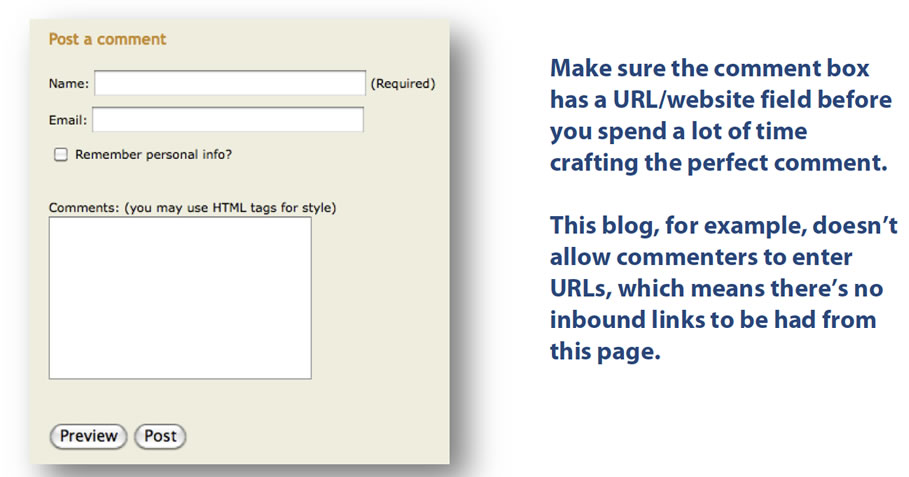
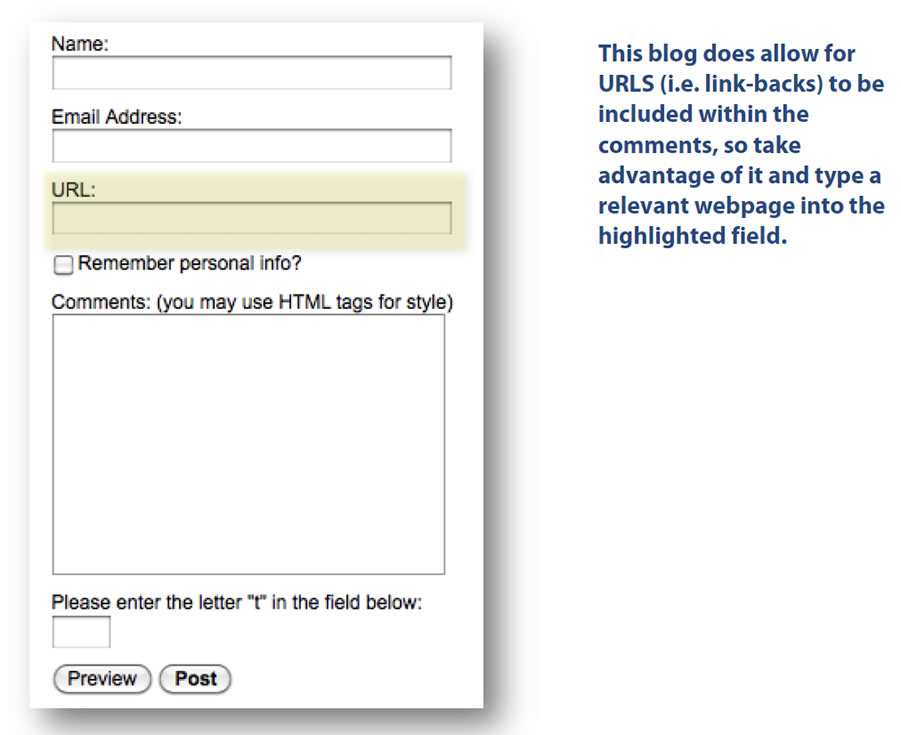
Post a comment image wrong

Example: Correct
Post a comment image correct

Video Site Sharing List

I will have the list of video sharing sites I use included in each task’s spreadsheet. You will not have to decide where to post videos, I will do this.

What’s Most Important About Video Submissions

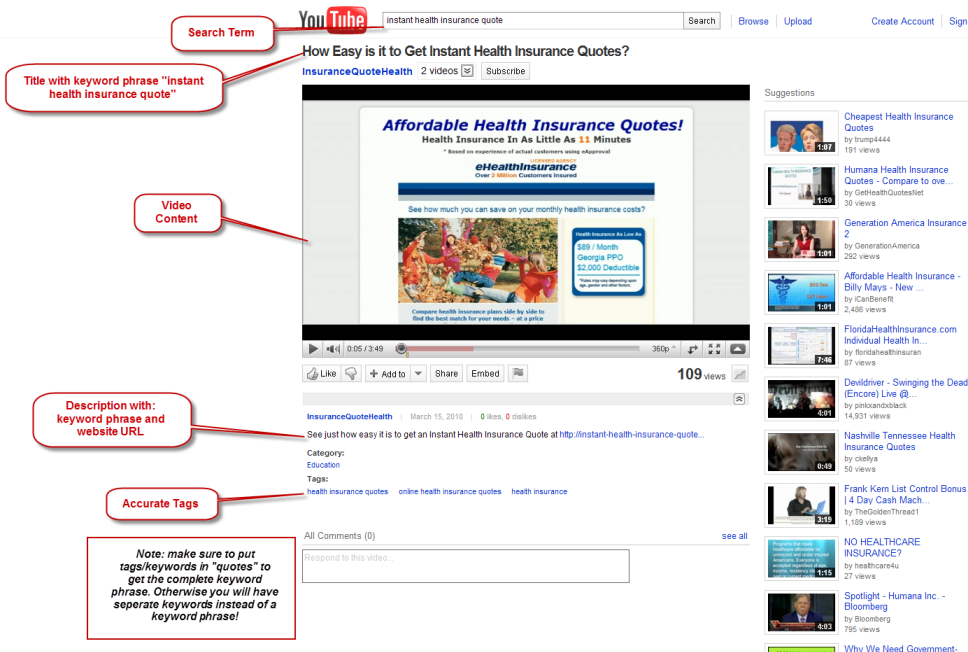
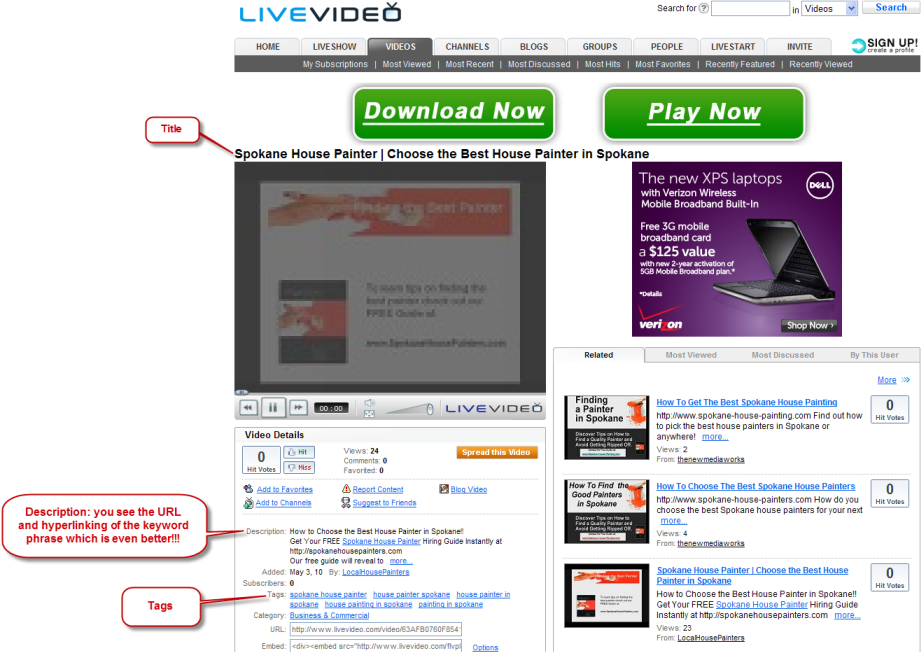
1) You will always want to include the keyword phrase I am targeting in the Title, Description and Tags

2) Make absolutely certain you include the website URL in the Description

3) If making videos, make sure to watermark the videos with the website URL

See Examples:

Youtube.com

video sharing example

Livevideo.com

video sharing example2

Onlywire

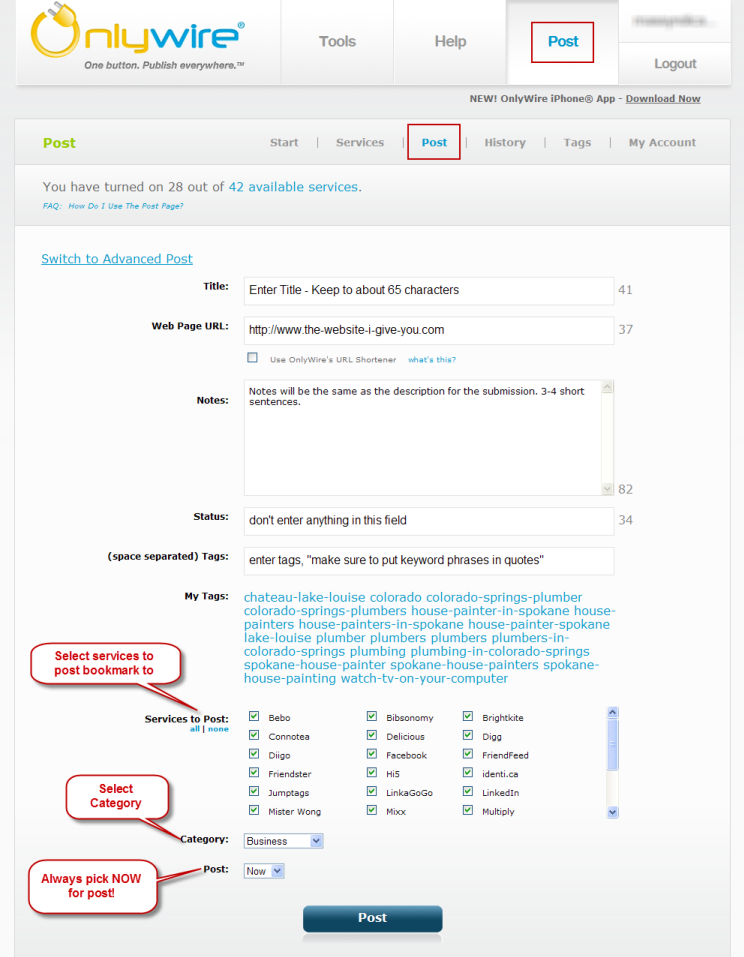
1) Log into Onlywire.com

2) Click on “Post” on the top navigation bar

3) onlywire posting

4) That’s it! I will monitor the failed submissions and ping the RSS feeds.

Additionally you can do the following:

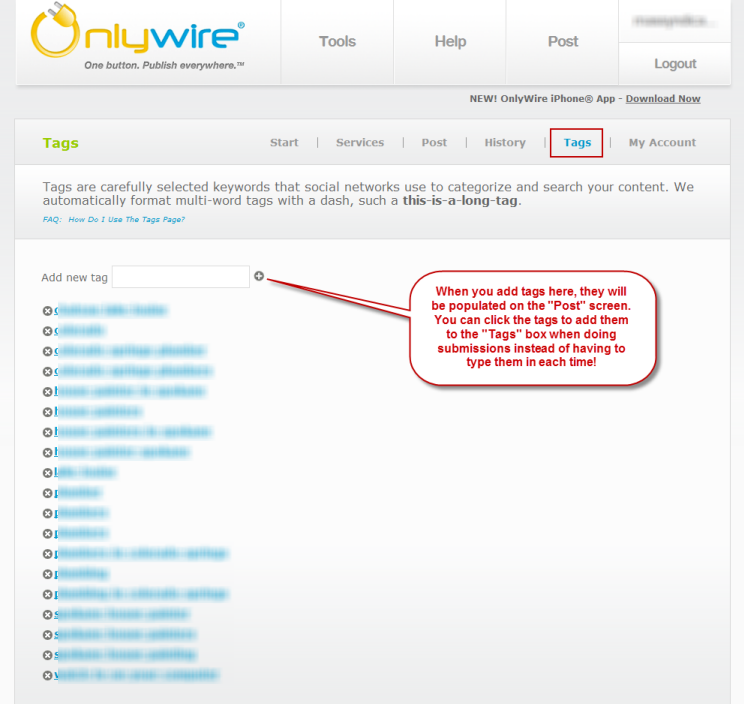
onlywire using tags

Enter tags in box and click the + sign and they will be saved for future use.

PAD Files

A P.A.D. file stands for, “Portable Application Description” and rightfully so, it DESCRIBES a file that you create – and upload to directories – and in that file, there is a link back to your money site. (PAD files are .xml files – FYI)

Another way to describe a PAD file – is like an envelope that contains another file that you create (like a .pdf or .exe file). This “envelope” (or PAD file) is then “mailed” to many different directories with your URL in the “return address”… For getting backlinks, the type of file you put in your PAD file – isn’t that important.

Software Creation Resources: (you need to do this part first)

Training Videos:

2: How to Make a Screen Saver

3: How to Create a Free .PDF File

4: How and Where to Upload Your .PDF/Screensaver File and PAD (.xml file)

Files you will upload:

1. Your PDF, .EXE or Other Type of Downloadable File

2. An Image – Like A Screenshot or Image Used In Your File

3. Your PAD (.XML) File

5: How to Make the Download-Page in Squidoo for Your Pad Submission

6: How to Generate & Submit the PAD (xml file) for Validation to the OMT Tool

The 2 places that you can provide a URL in the PAD file are as follows:

  • Company Website URL

  • Application Info (seen in image above)

Depending on the directories that your file is submitted to – some will display both of these URLs when posted – and others will only display the “Application Info”.

So we recommend that you put a link to the page you want to get the “link-juice” from, in the “Application Info” box.

7: How to Use the GSA Auto SoftSubmit – Pad Submission Software

Here is a FREE PAD Submission Service http://www.submitpadfiles.com that you can use as well.

How to use this service Training Video http://video.nameserve-two.info/apprentice/apprentice2/pad/video8/

PAD File – Summary:

  • Create a screensaver or .pdf file with your content in it.

  • Upload this file (along with a .jpg of an image you are using) to your GoTryThis FTP server.

  • Create a “Download Page” (using a Web2 property of your choice) that points to your downloadable file on the server, saying something like, “Download Here”.

  • Create a PAD file to describe your downloadable file (with the proper links to the files on the server) and a link to your “Download Page”.

  • Validate the PAD file to ensure that the links are working properly.

  • Upload the PAD file to the same directory on the server as the other 2 files

  • Optional Step: Submit your PAD.xml file to the free pad file submitter.

Get Indexed Fast

List for getting indexed fast:

statbrain.com/www.mydomain.com
websiteoutlook.com/www.mydomain.com
builtwith.com/?mydomain.com
snapshot.compete.com/mydomain.com
aboutus.org/mydomain.com
quantcast.com/mydomain.com
cubestat.com/www.mydomain.com
whois.tools4noobs.com/info/mydomain.com
alexa.com/siteinfo/mydomain.com
alexa.com/data/details/?url=mydomain.com
siteadvisor.cn/sites/mydomain.com/summary/
whois.domaintools.com/mydomain.com
aboutdomain.org/backlinks/mydomain.com/
whoisya.com/mydomain.com
who.is/whois-com/mydomain.com
robtex.com/dns/mydomain.com.html
zimbio.com/search?q=mydomain.com&btnG=Search
whois.ws/whois-info/ip-address/mydomain.com
whoisx.co.uk/mydomain.com
searchanalytics.compete.com/site_referrals/mydomain.com
Craigslist: post in 10 regions in small biz ads using anchor text
USFreeAds: use keyword as anchor text
Oodle: use site’s url as listing url
Epage: no anchor so post just link

Building Web 2.0

Web 2.0 Resources

How To Videos: Step-by-step videos to help you all the way.

  1. Creating a First Squidoo Lens

  2. Creating Squidoo Lens Content

  3. Creating Clickable Images

  4. Create a Wetpaint Page

Squidoo Quick Start Guide Wetpaint Quick Start Guide

…Remember that the 3 most important places for you to put your Keyword Phase are:

  1. In the URL

  2. In the Title

  3. In the Headline of Your Content

Where to Find Content for Your Properties

Here are some places that you can “borrow” your images
and content for you new properties…

  • Amazon.com – Do a search on your product and tap into the images, descriptions and comments that are posted about it.

  • Answers.yahoo.com – There is lots of unique content to draw from here too.

  • www.Ezinearticles.com – Still yet another great resource for content!

  • Your Clickbank product’s sales page itself!

  • Google Alerts – use your general keywords and have a comprehensive alert sent to you once per week.

IMAGES:

EXAMPLES: